Control plane
The server registers agents, issues short-lived credentials, distributes signed policy bundles, and stores the audit trail. The SDK still evaluates each action in process. A decision does not wait on the network.
Run locally
From a checkout, with the server package installed:
uv run tessera server dev
The command migrates a SQLite database at .tessera/server.db, prints
http://127.0.0.1:8700, and then prints an admin key. It listens only on
127.0.0.1. Another --host exits with dev mode binds 127.0.0.1 only.
--port changes the port. When TESSERA_SERVER_ISSUER is unset, the issuer
is that printed URL.
/healthz returns {"status": "ok", "dev": true}. The React console is at
/app (the default landing from /). Sign-in is at /login (or SSO). On
this loopback server the console pages are available without signing in.
Paste the admin key on /login when you open the UI from somewhere else.
Legacy /ui/login redirects to /login for one release.
A client that has only TESSERA_URL set registers itself. The server creates
an owner dev@localhost, an agent in the dev environment, and a permissive
policy when that agent does not exist yet. See
policies/examples/dev-permissive.yaml.
TESSERA_URL=http://127.0.0.1:8700 uv run python examples/server_agent/agent.py
The example prints a decision for files.read, files.delete, and
shell.exec. On the development policy all three are allowed.
Console
From v0.6 the operator surface is the React console at /app. Start the
development server, open http://127.0.0.1:8700/ (redirects to
/app/overview), and use the sidebar: Overview, Explorer,
Agents, Traces, Approvals, Insights, and Settings.
Sign-in uses /login (or SSO); after login the browser lands on
/app/overview. Classic Jinja operator pages under /ui were removed in
v0.7; legacy /ui/* paths redirect to /app/overview.
Screenshots below come from the Playwright suite
(web/tests/e2e/screenshots.spec.ts against the seeded e2e server).
Regenerate them with npm --prefix web run build && npm --prefix web run
screenshots.
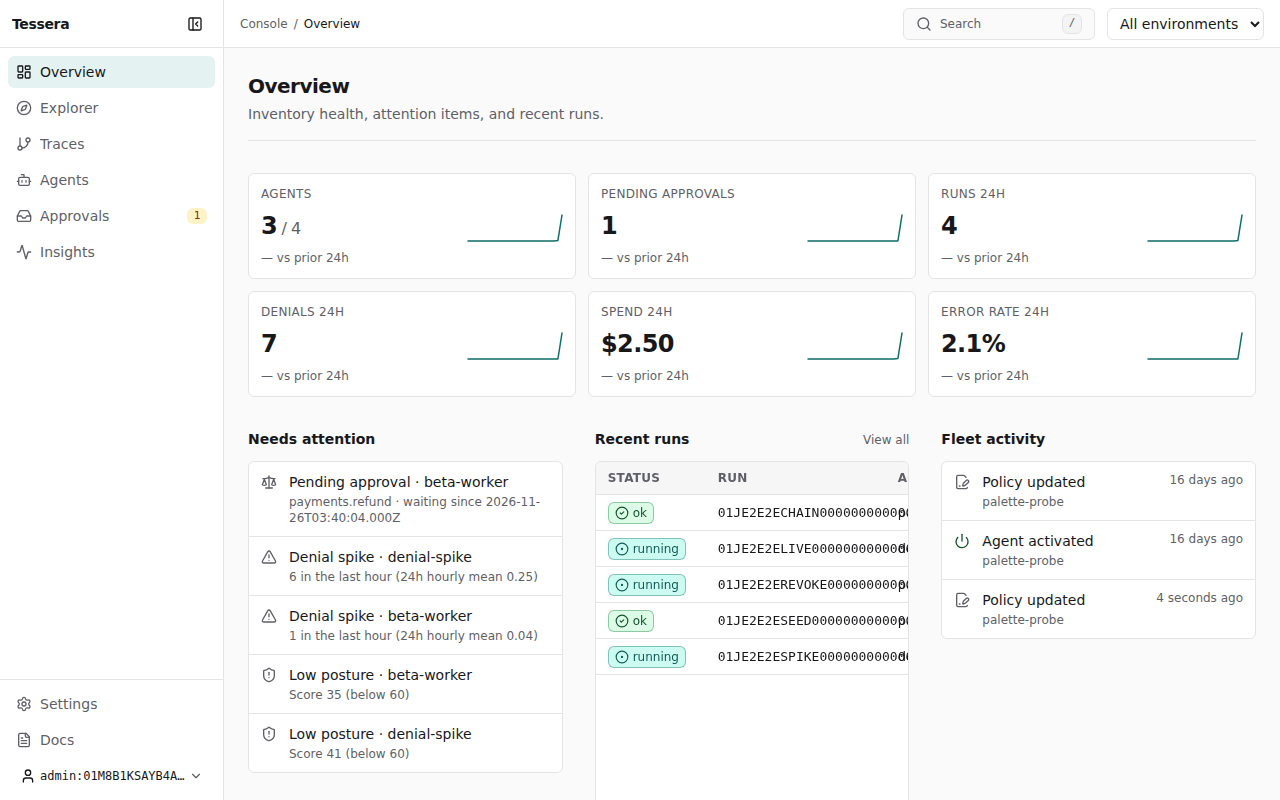
Overview. KPIs for the last 24 hours, needs-attention cards (denial spikes, pending approvals, low posture), recent runs, and (from v0.6.1) a Fleet activity strip that polls recent revocations.
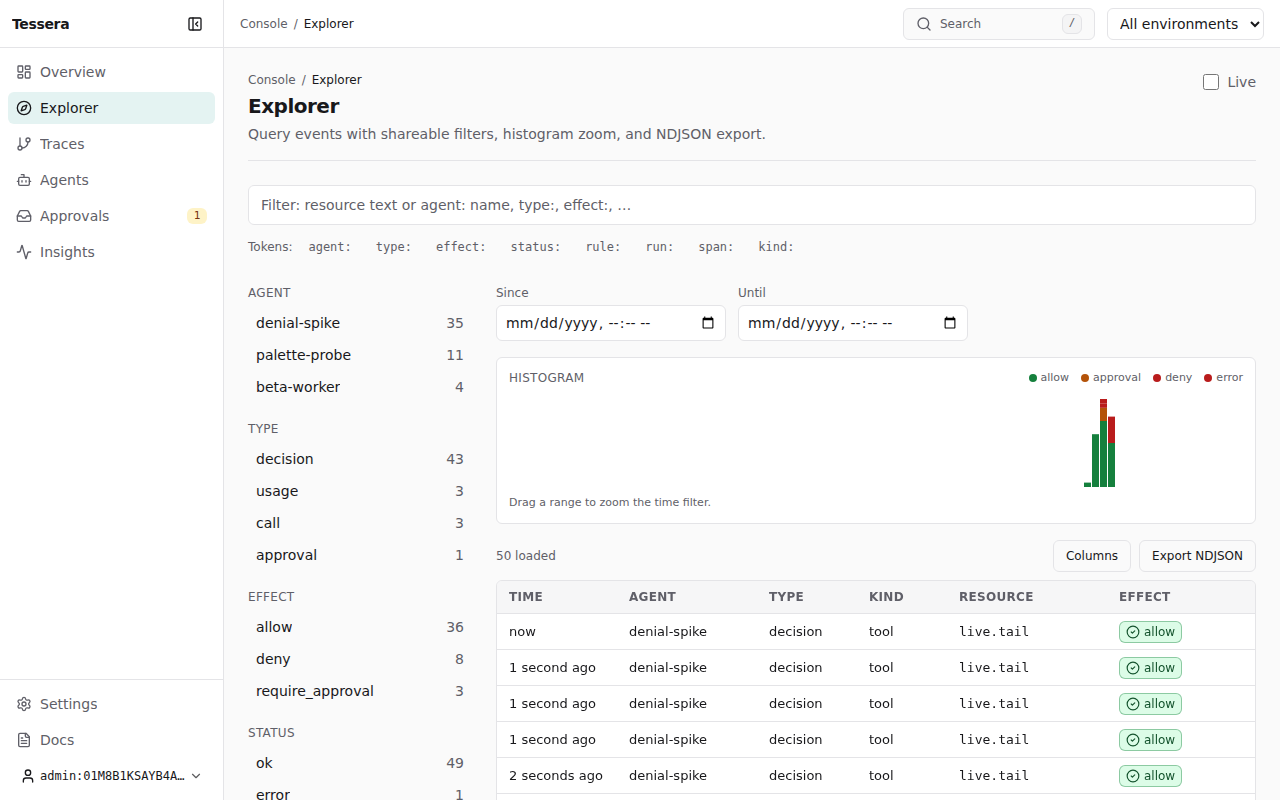
Explorer. Structured query chips (agent:, type:, effect:, …),
facet counts, histogram brush, live tail, and a detail drawer per event.
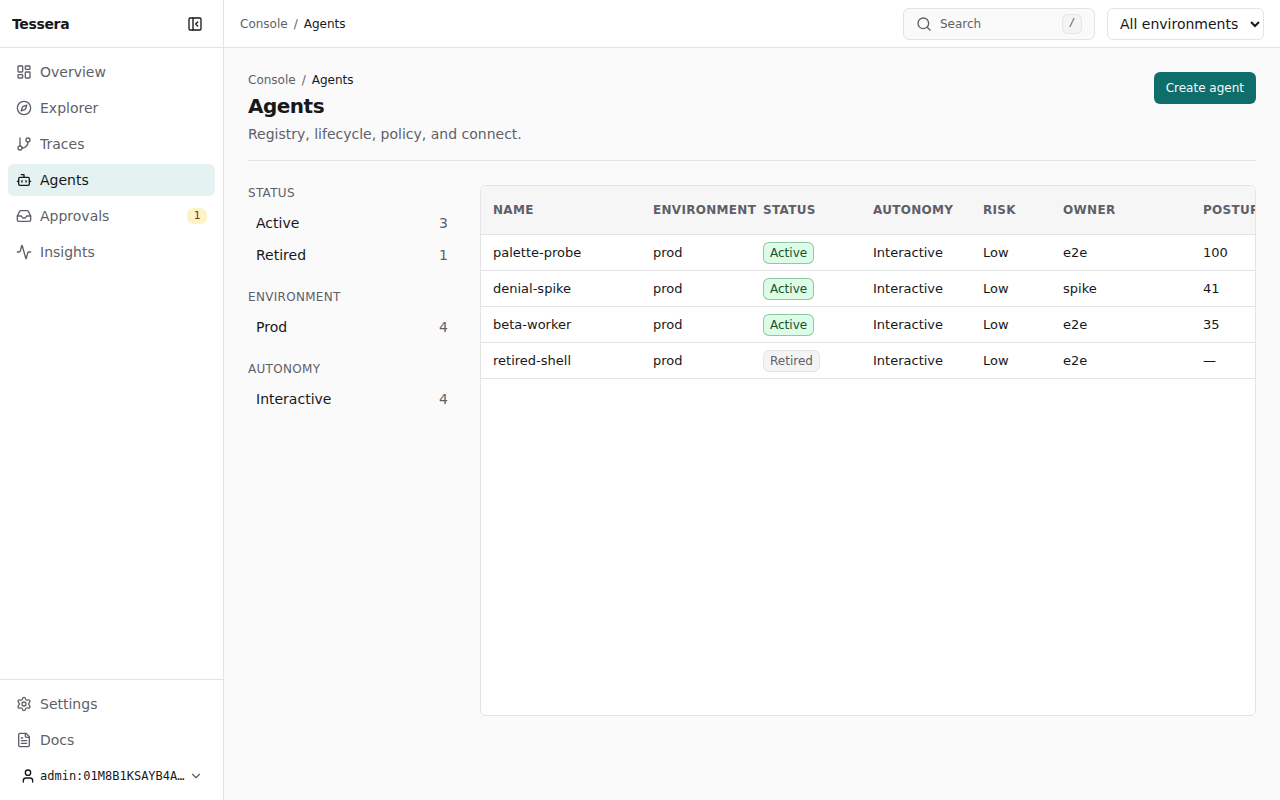
Agents. Inventory with status, environment, autonomy, posture, and create / lifecycle actions. Open a row for policy, access footprint, metadata edit, connect, instances, and activity.
Insights (v0.6.1). Spend, denials, footprint, posture, and Quotas
(usage vs ceilings from GET /v1/quotas).
Settings (v0.6.1). Owners directory, alerts, webhooks (including edit), baselines, custody, admin keys, and Audit (chain verify + log).
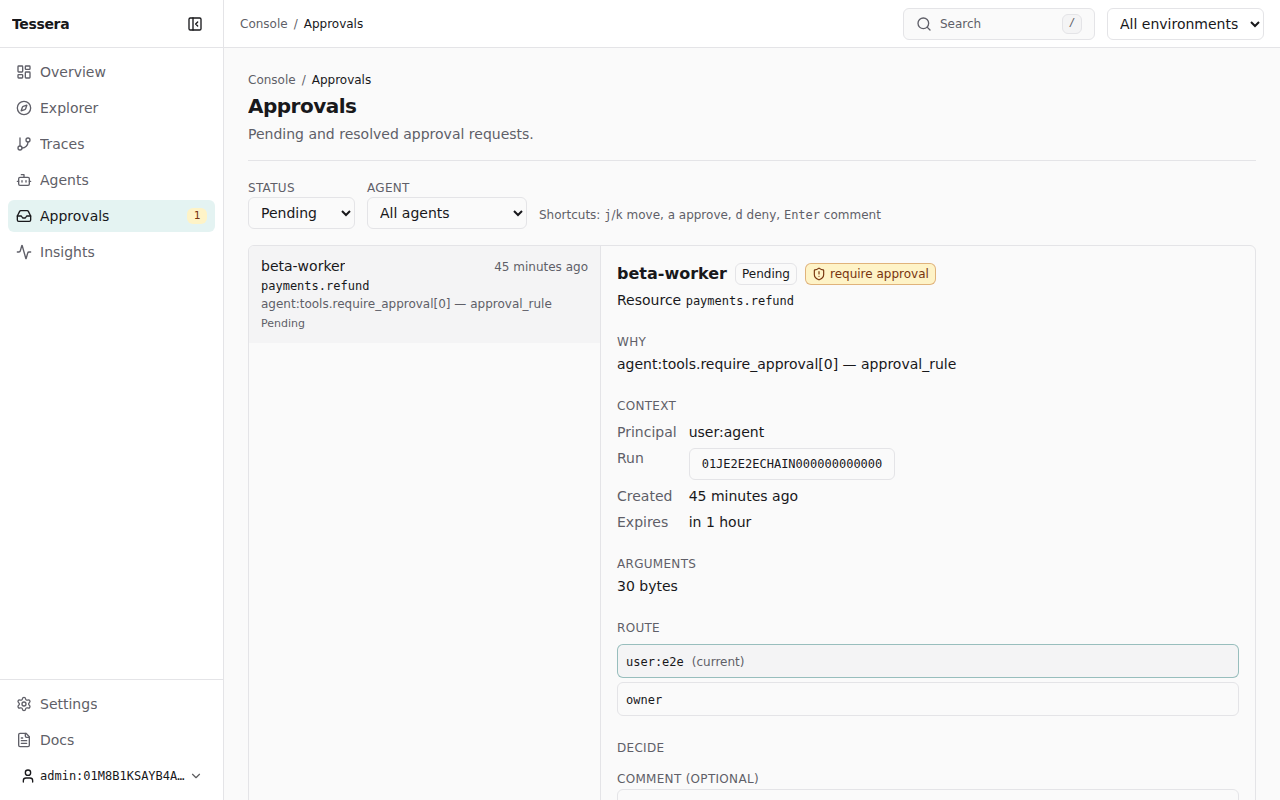
Approvals. Split inbox: filter pending requests, decide with a comment, or follow the run link into the waiting span on the trace.
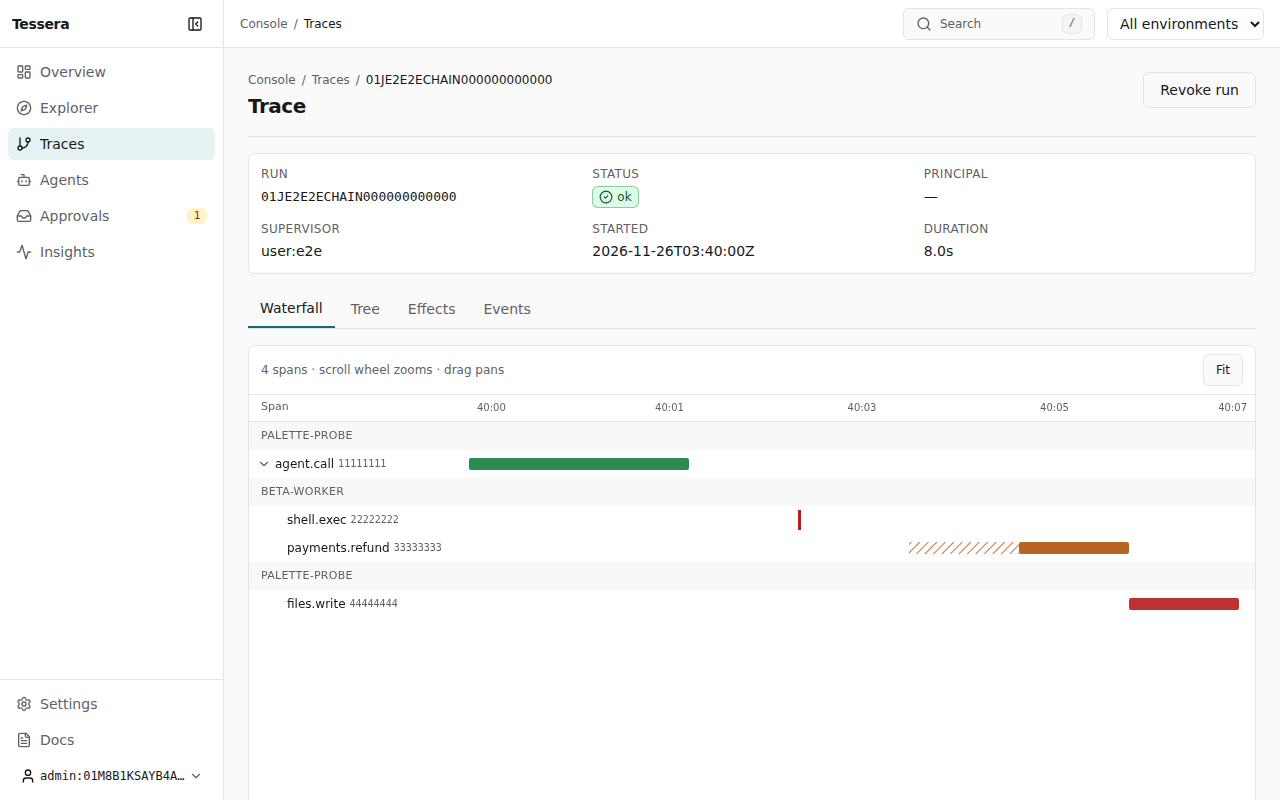
Traces. Run list and a virtualized waterfall with agent swimlanes, denial markers, and approval hatching. See Governance traces for span ids, cross-agent parents, and the OpenTelemetry link.
Command palette: ⌘K / Ctrl-K / / searches agents, runs, spans, and
rules. Paste a 16-hex span id to jump to its run. Theme toggle lives under
the actor menu (light and dark).
First hour
Start the development server and leave it running:
uv run tessera server dev
The first printed line is http://127.0.0.1:8700. The next line is the
admin key (tsa_...). Open http://127.0.0.1:8700/ (redirects to the
React console at /app; post-login lands on /app/overview). On this
loopback server the console loads without the login form. Elsewhere, paste
the admin key on /login; that creates a server-side session cookie
(tss_…) with idle and absolute limits (see
Admin UI sessions below).
Primary navigation in the console is Overview, Explorer, Agents, Traces, Approvals, Insights, and Settings, with theme and Log out under the actor menu. An empty org Overview offers onboarding (create agent → policy template → connect → first event).
Register an agent named playground in the dev environment. Open
Agents, choose New agent, set the name to playground, leave the
environment as dev, and set the owner email to playground@localhost.
The agent is created as draft. Or start from Start onboarding on
Overview when the org has no agents yet.
The same registration from another terminal, using the printed admin key:
TESSERA_ADMIN_KEY='tsa_...' uv run tessera agents register playground \
  --owner playground@localhost \
  --env dev \
  --server http://127.0.0.1:8700
Run the server demo against that agent
(examples/server_agent/agent.py):
TESSERA_URL=http://127.0.0.1:8700 uv run python examples/server_agent/agent.py playground
The development server attaches the permissive policy and activates a
draft agent when the example connects. The three lines are allow with
reason allow_rule:
files.read: allow (allow_rule)
files.delete: allow (allow_rule)
shell.exec: allow (allow_rule)
After that run, open these console pages (loopback needs no login):
| URL | What you should see |
|---|---|
/app/overview |
Overview tiles; posture / needs-attention; fleet activity |
/app/agents → playground |
Overview, Policy, Access, Instances, Connect, Activity |
/app/approvals |
Empty pending list until a policy requires approval |
/app/explorer |
Live / filtered event stream |
/app/insights |
Spend, denials, footprint, posture, quotas |
/app/settings/alerts |
Alert rules (Create / Delete) |
/app/settings/webhooks |
Outbound webhooks and Send test |
Open the playground row and press Suspend. The status chip reads
suspended. Run the demo again. The server rejects the suspended agent,
and the process exits with ServerError: server returned 403. Press
Activate on the same page to allow the example again.
Approvals. For a deny or approval outcome, edit the policy on the
agent Policy tab (or use examples/approvals/agent.py with a policy
that require_approval on files.delete). Open Approvals. The list
defaults to pending requests, and the navigation badge is that count. A
row shows Why, Run, age, resource, effect, and time left. Approve
resolves to allow; Deny leaves the agent call denied. Keyboard
shortcuts (j/k, a/d, Enter, ?) work when the inbox has focus.
A pending request past half of its timeout is highlighted.
Activity. From an agent, open the Activity tab for a live fragment, or use Activity → Live / Audit in the primary nav. Live rows show time, agent, kind, resource, effect, duration, and rule, with a Pause checkbox. Audit filters by agent name, type, effect, and since window; each row expands to the stored JSON. Verify chain shows an ok or failed banner.
CLI. Store a profile with tessera login --server URL, then use
tessera status, tessera approvals ls|show|approve|deny, and
tessera events tail without exporting TESSERA_ADMIN_KEY every time.
TESSERA_URL / TESSERA_ADMIN_KEY still override the file.
Offline SDK half. Without a server, follow Quickstart
(examples/quickstart/agent.py). That walkthrough allows files.read,
requires approval for files.delete, and denies shell.* — no API keys
and no control plane.
Docker Compose
Copy .env.example to .env. Set POSTGRES_PASSWORD and
TESSERA_SERVER_KEK to a base64-encoded 32-byte key:
python -c "import os, base64; print(base64.b64encode(os.urandom(32)).decode())"
Then:
docker compose up --build
Compose starts Postgres 16 and the server. The server container runs
tessera server migrate and then listens on port 8700 as a non-root user.
The database URL points at the Postgres service. TESSERA_SERVER_ISSUER
defaults to http://127.0.0.1:8700.
This mode is not the development server. Clients need a registration token,
and /ui asks for the admin key. Create one with:
docker compose exec server tessera server create-admin-key --name ops
The key is printed once. It starts with tsa_.
Helm
The chart in deploy/helm/agent-tessera installs a Deployment, a Service, a
ConfigMap, and a Secret. Ingress is off until ingress.enabled is true.
An external database is the default: set database.url. Set
postgresql.enabled only for a trial of the bundled Postgres subchart.
kek.value is the base64 of 32 bytes. kek.existingSecret names a Secret
you manage. That Secret must contain TESSERA_SERVER_KEK and
TESSERA_SERVER_DATABASE_URL. issuer is the public base URL. oidc.issuer,
oidc.clientId, and oidc.clientSecret turn on admin SSO. The chart README
has the install command. Render it with helm dependency update and then
helm template. No cluster is required for that check.
Upgrade from 0.3
Reuse the existing Postgres database and the existing key-encryption key.
Set database.url, or point kek.existingSecret at a Secret that already
has TESSERA_SERVER_KEK and TESSERA_SERVER_DATABASE_URL. The chart never
generates a KEK. OIDC remains optional. On start the pod runs
tessera server migrate, which applies Alembic revisions through head
0012. The chart README shows the helm template commands for the
external-database default, the bundled-Postgres trial, and an existing
Secret.
Register an agent
Send the admin key as Authorization: Bearer <key>.
curl -s -X POST http://127.0.0.1:8700/v1/owners \
  -H "Authorization: Bearer $TESSERA_ADMIN_KEY" \
  -H "Content-Type: application/json" \
  -d '{"type":"user","email":"ada@example.com","display_name":"Ada"}'
Use the returned id as owner_id:
curl -s -X POST http://127.0.0.1:8700/v1/agents \
  -H "Authorization: Bearer $TESSERA_ADMIN_KEY" \
  -H "Content-Type: application/json" \
  -d '{"name":"triage","environment":"prod","owner_id":"<owner id>"}'
The agent starts as draft. Upload a policy whose metadata.agent and
metadata.environment match the agent, then activate it. Activation without
a policy returns 409.
curl -s -X PUT http://127.0.0.1:8700/v1/agents/<agent id>/policy \
  -H "Authorization: Bearer $TESSERA_ADMIN_KEY" \
  -H "Content-Type: application/yaml" \
  --data-binary @policy.yaml

curl -s -X POST http://127.0.0.1:8700/v1/agents/<agent id>:activate \
  -H "Authorization: Bearer $TESSERA_ADMIN_KEY"
A baseline is a separate YAML document. Its name in the URL must match
metadata.name. A baseline whose selector matches the agent is part of the
bundle the client receives.
curl -s -X PUT http://127.0.0.1:8700/v1/baselines/prod-guard \
  -H "Authorization: Bearer $TESSERA_ADMIN_KEY" \
  -H "Content-Type: application/yaml" \
  --data-binary @baseline.yaml
The admin UI has the same operations. New agent registers a draft, and Upload baseline stores a baseline. The agent page uploads a policy, suspends, activates, retires, and creates a registration token. Check Reusable and fill in Expires in seconds for a token that more than one instance can use. A rejected form stays on the page and shows the API error.
Registration token
curl -s -X POST http://127.0.0.1:8700/v1/agents/<agent id>/registration-tokens \
  -H "Authorization: Bearer $TESSERA_ADMIN_KEY" \
  -H "Content-Type: application/json" \
  -d '{"reusable": false}'
The response field token starts with tsr_ and is shown once. The default
token works for one instance. "reusable": true lets more than one instance
use it. "expires_in" is a lifetime in seconds. Omit it for no expiry.
Give that value to the process as TESSERA_AGENT_TOKEN.
Admin SSO
Admin SSO is the browser UI. The HTTP API still uses an admin key (tsa_).
Set these on the server:
| Variable | Meaning |
|---|---|
TESSERA_OIDC_ISSUER |
Identity provider issuer. SSO stays off when this is empty. |
TESSERA_OIDC_CLIENT_ID |
OAuth client id. |
TESSERA_OIDC_CLIENT_SECRET |
OAuth client secret. |
TESSERA_OIDC_REDIRECT_URL |
Callback. The default is {issuer}/oidc/callback. |
TESSERA_OIDC_REQUIRED |
1 hides the admin-key form. |
TESSERA_OIDC_ADMIN_GROUP |
When set, the ID token groups claim must include this value. |
Open /oidc/start. The server redirects to the provider and, after the
callback, starts a session and sends the browser to /app/overview.
Legacy /ui/oidc/* paths redirect for one release. The session cookie
authorizes browser calls to /v1 (with CSRF on mutates); use an admin key
for curl. When TESSERA_OIDC_REQUIRED is 1, the login form is hidden
and the admin key still works on the API.
Admin UI sessions
Signing in with the admin-key form or with SSO creates a session on the
server. The browser cookie holds only an opaque tss_ value. It never holds
the admin key or the SSO subject. The server stores a hash of the cookie
secret, so a copied database row cannot be replayed as a cookie.
| Variable | Default | Meaning |
|---|---|---|
TESSERA_SERVER_SESSION_IDLE |
8h |
A session with no request for this long ends. |
TESSERA_SERVER_SESSION_MAX |
24h |
A session ends this long after sign-in, whatever its use. |
Both accept Nh, Nm, Ns, or a number of seconds. Log out ends the
session on the server. Revoking or rotating an admin key ends every session
created with it. An SSO session ends when SSO is no longer configured. Each
sign-in and log out writes an admin_login or admin_logout audit row with
the session id, not the cookie.
Mutating /ui forms include a CSRF token. A missing or wrong token returns
403. htmx requests send the same value as X-CSRF-Token. The login form and
development loopback stay exempt.
An admin key is break-glass. Turning on SSO does not retire it. Anyone who holds the key can change agents, policies, and provider secrets. Keep few keys, store them the way you store the key-encryption key, and create a replacement if one might have leaked. The server stores only a hash of the key. It does not write the admin key, the OIDC client secret, or a provider API key to the log.
To replace a break-glass key and disable the previous one with the same name:
tessera server rotate-admin-key --name ops
The new key is printed once. An audit row records the new and previous key ids, not the secrets. The old key is rejected on the API and the login form, and admin UI sessions started with it end.
Workload identity
A process that can present an OIDC JWT can skip the registration token.
TESSERA_WORKLOAD_BINDINGS is a JSON list. The first object whose issuer,
agent, and environment match the request is used. audience must equal
the token audience. claim defaults to sub and must be a non-empty string.
export TESSERA_WORKLOAD_BINDINGS='[
  {"issuer":"https://kubernetes.default.svc","audience":"tessera",
   "agent":"billing","environment":"prod","claim":"sub"}
]'
On Kubernetes, project a service-account token into the pod (the projected
volume at /var/run/secrets/kubernetes.io/serviceaccount/token). Set the
binding issuer to that cluster's issuer. https://kubernetes.default.svc
is the usual in-cluster issuer; use the issuer your API server actually puts
in the token. The token sub looks like
system:serviceaccount:prod:billing. The audience is the one you requested
in the projection, and it must match the binding.
curl -s -X POST http://127.0.0.1:8700/v1/token \
  -H "Content-Type: application/json" \
  -d '{"grant_type":"workload","assertion":"<sa jwt>",
       "agent":"billing","environment":"prod",
       "instance_id":"<32 hex>","runtime":{}}'
The response is the same runtime JWT a registration token would return. A
wrong audience is 401. The grant type is workload. The assertion is an
OIDC JWT, including a Kubernetes service-account token. There is no separate
grant for cloud instance metadata.
SDK server mode
import os

from agent_tessera import Tessera
from agent_tessera.types import Action

os.environ["TESSERA_URL"] = "http://127.0.0.1:8700"
os.environ["TESSERA_AGENT_TOKEN"] = "tsr_..."

with Tessera("triage") as client:
    with client.task("demo"):
        client.enforce(Action.tool("files.read"))
server_url and agent_token arguments override the environment variables.
The agent name must be the name registered on the server. A local policy
argument, or TESSERA_POLICY, together with a server URL raises
ConfigError. The server is the source of the policy.
On startup the client exchanges the registration token for a short-lived
credential, verifies the signed bundle, and caches both under
.tessera/cache (or TESSERA_CACHE_DIR). Later check and enforce calls
use that cache. A background thread refreshes the credential and polls for a
new bundle. Another thread follows GET /v1/revocations/stream and uploads
events to POST /v1/events.
Events stay in memory until an upload fails, then they are written under
TESSERA_SPOOL_DIR (default .tessera/spool) and sent when the server is
reachable again. close() writes a stop event and flushes. A local
.tessera/audit.jsonl file is written only when you pass audit_path or set
TESSERA_AUDIT_PATH.
A token request may send bound_supervisor (user: or group:). That value
is stored on the instance. task(..., supervisor=) and the first event that
names a supervisor store the run binding, and a later event does not replace
it. The supervisor used for a run is that run binding, then the instance
binding, then the first static supervisor.
client.mode is "server". client.policy is the effective policy, or
None when fail-open mode has no bundle yet.
Kill switch
Suspend an agent to deny every later action. The client learns this from the
revocation stream and reports reason suspended. resume() on the client
does not clear a server suspension. Activate the agent to allow calls again.
curl -s -X POST http://127.0.0.1:8700/v1/agents/<agent id>:suspend \
  -H "Authorization: Bearer $TESSERA_ADMIN_KEY"

curl -s -X POST http://127.0.0.1:8700/v1/agents/<agent id>:activate \
  -H "Authorization: Bearer $TESSERA_ADMIN_KEY"
Revoking one instance (POST /v1/instances/<instance id>:revoke) suspends
that instance only. Retiring an agent is permanent.
client.suspend() is a local switch for the current process. It does not
change the agent on the server.
Circuit breaker
A policy circuit_breaker counts denial decisions inside its window. Offline,
that count is per process. In server mode the SDK uploads those decisions and
the server counts them for the agent. When the count reaches denials, the
server carries out action: suspend (the same revocation as an admin
suspend) or revoke_run (the run named by the denial's task). A
circuit_open decision does not count again. The client also applies the
action locally, so the next check is suspended or run_revoked.
Approvals
POST /v1/approvals with a runtime token stores a request and returns
{id, status, expires_at}. The route comes from the agent policy. principal,
supervisor, and owner are resolved to a party; an entry with nobody to ask
is skipped. When none remain, the response is 422 approval_unavailable.
Each party is offered the request for approvals.timeout. The server process
advances route_index when that time passes. After the last party, the status
is timeout.
An admin key may approve or deny a pending request. A runtime token may do so
only when it is the party currently offered the request, it is not the
requesting agent, and it does not take part in the run. With
forbid_self_approval (the default), the requesting principal cannot approve
it either. A second decision returns 409.
GET /v1/approvals/{id} is open to that agent and to an admin.
GET /v1/approvals is admin-only and accepts status and agent_id.
The console lists requests at /app/approvals. Open one to approve or deny
it. The signed-in admin's name is the approver.
examples/approvals/agent.py is a client that blocks on files.delete
until the server grants the approval. Set TESSERA_URL and
TESSERA_AGENT_TOKEN. The integrations are documented in
Integrations.
Webhooks
POST /v1/webhooks stores {url, events, secret, active}. An empty events
list delivers every event. secret is optional and is not returned; the
document says has_secret instead. PUT and DELETE use the same admin key.
GET /v1/webhooks lists endpoints.
When an approval is created or escalated, the server POSTs
approval.requested. An approval, denial, or timeout posts
approval.resolved. The body is JSON. The header X-Tessera-Signature is
sha256= plus the HMAC-SHA256 hex of that body. An endpoint secret overrides
TESSERA_WEBHOOK_SECRET. Delivery tries three times. A failure is written to
the audit log and does not fail the approval request. Redirects are not
followed.
Set TESSERA_WEBHOOK_URL to register one catch-all endpoint at startup. It
uses TESSERA_WEBHOOK_SECRET unless an endpoint stores its own secret.
Posture
GET /v1/agents/{id}/posture scores the last seven days. coverage is the
share of required input guardrails (input.*) that ran. It is 1 when the
policy requires none, and 0 when no readable policy is stored. score is an
integer from 0 to 100:
| Component | Points |
|---|---|
| Active owner | 20 |
| Agent policy lists every required guardrail | 20 |
| Coverage | 30 times coverage |
| Denial rate | 15 at or below 5 percent, 0 above 25 percent, linear between. No decisions score 15. |
No ungoverned_call |
15 |
| Probe results | 0 until verified probes exist |
A guardrail counts as run when a guardrail event in the window has
status: ran. Denial rate is deny decisions divided by decision events.
The score rounds half up. The agent page lists each component. The overview
lists each agent's score and coverage.
Key custody
POST /v1/custody/secrets stores a provider API key. The body is name,
provider, and secret. The server encrypts secret with its key-encryption
key and does not return the plaintext. GET /v1/custody/secrets lists each
key's id, name, and provider. GET and PUT /v1/custody/secrets/{id} return
those same fields. PUT can replace the name, provider, or secret.
DELETE /v1/custody/secrets/{id} removes the row. These routes require an
admin key. The audit log records the id, name, and provider.
Console Settings → Custody shows the same id, name, and provider list.
Creating or revealing a secret stays on the API; the page never shows
plaintext or ciphertext.
POST /v1/custody/issue is for a runtime JWT. The body names a provider
or a name. The response is provider, api_key, and expires_at. The
lifetime defaults to 60 seconds and cannot exceed 120. The audit row records
the agent, instance, and expiry, not the key. A provider that matches more
than one stored key is rejected until the request names one. Set
TESSERA_KEY_CUSTODY=1 on the SDK to fetch a key before each governed model
call, sets api_key on the wrapped client for that provider, and restores
the previous value when the call returns. Offline mode does not fetch a key.
Dashboards
GET /v1/dashboards/summary returns inventory counts, orphaned agents,
dormant agents, pending approvals, spend_24h, and denials_24h. A dormant
agent is not retired and has no event in the last seven days. Spend is the
sum of usage event cost_usd values. Denials are decision events whose
effect is deny. Both spend_24h and denials_24h use the inclusive window
[now - 24h, now], the same window as the console Insights dashboards.
Events after now are not counted.
/app/insights shows the same totals. A bar chart is drawn when a value is
above zero. Spend defaults to the last 24 hours and can group by agent or
model.
GET /v1/dashboards/spend takes inclusive from and to timestamps and
group_by=agent or group_by=model. Agent rows include agent_id and
name. Model rows include model. GET /v1/dashboards/denials uses the
same window and groups by agent.
Footprint
GET /v1/footprint totals stored events. agent_id, from, and to are
optional. from and to are ISO-8601 timestamps. The totals are
tokens_in, tokens_out, cost_usd, model_calls, tool_calls, and
denials. It also returns energy_j, co2e_g, and estimate: true.
Energy is joules from pricing/energy.json (joules per 1,000 tokens).
Carbon uses that file's grid_g_co2_per_kwh. A usage event whose model is
not in the table makes both numbers null. The agent page shows the same
token, cost, and call totals for that agent.
GET /v1/agents/{id}/footprint/access compares the effective policy's grants
with the last 30 days of events. It uses the same rules as
tessera footprint: an allow or require_approval decision is observed, a
call is observed by its resource, and an unused grant matches no observed
resource of that kind. A missing policy returns empty lists.
The server stores every uploaded event. It does not sample events or drop them by age.
Live activity
The console Explorer live tail streams recent call and decision events
via GET /v1/events/stream. Agent Activity and Traces deep-link into the
same event set.
Alerts
POST /v1/alerts stores a rule. metric is one of the footprint totals.
threshold is a positive number. window is a duration such as 30s,
10m, or 1h, at most 168h. selector.labels and selector.autonomy
choose which active agents the rule watches. action is webhook or
suspend.
The server evaluates rules on the same one-second loop as approval
escalation. A footprint at or above the threshold emits monitor.alert.
suspend also suspends that agent. The same rule does not fire again for
that agent until the window has passed. Alert rules are managed at
/app/settings/alerts.
Effect ledger
A governed process can record what a run changed with record_effect. The
server keeps the opaque ref, whether it is reversible, and an optional undo
tool name. It does not store the content of the change.
curl -s http://127.0.0.1:8700/v1/runs/<task id>/effects \
  -H "Authorization: Bearer $TESSERA_ADMIN_KEY"
The admin run page lists the same references.
Revoke a run
A task id is the run id. The server creates the run when it ingests an event
that names that task. Revoking it denies later actions inside that task, on
every instance, with reason run_revoked. Actions outside the task are
unchanged.
curl -s -X POST http://127.0.0.1:8700/v1/runs/<task id>:revoke \
  -H "Authorization: Bearer $TESSERA_ADMIN_KEY"
A missing run returns 404. Revoking it twice returns 409. While the agent
itself is suspended, decisions use reason suspended first.
GET /v1/audit/verify reports whether the server's hash chain is intact.
GET /v1/audit lists ingested events. Both require the admin key.
Fail modes
fail_mode is closed or open. The argument wins, then
TESSERA_FAIL_MODE, then open when TESSERA_ENV is dev, otherwise
closed.
When the server is unreachable at startup and a valid cache exists, both
modes start with the cached policy. With no usable cache, closed raises
ServerError and open allows actions with reason fail_open. A rejected
credential refresh denies every action with reason suspended in either
mode.
A cache file that fails signature checks is treated as missing. A 4xx response at startup does not fall back to the cache.
Leases
When the effective policy sets limits.tokens_per_day, every instance of
that agent shares the budget. The client requests a lease from
POST /v1/quotas/leases and renews it in the background. enforce does not
call the server for this.
Until the first grant arrives, model calls are denied with reason limit
and rule agent:limits.tokens_per_day. A lease lasts five minutes. Closing
the client reports how many tokens it used so the remainder can be granted
again. An expired lease that was never closed counts as fully used.
The same endpoint leases a named quota. The body defaults metric to
tokens and quota_name to tokens_per_day, which is the daily token
lease above. A named quota adds resource, principal, run_id, and
requested. The response keeps day and limit and adds remaining.
cost_usd counts millionths of a dollar; every other metric counts whole
units. agent and org quotas are keyed by the agent. principal,
supervisor, and run quotas are keyed by that id, and a missing id is
rejected. scope: instance and window: call do not take a server lease.
A quota with on_exhausted: suspend suspends the agent when its budget is
empty and writes the same revocation as an admin suspend. The SDK leases
agent, org, principal, and run quotas. Instance quotas stay on the instance.
A model call holds ceil(max(1, ceil(chars / 4)) * 1.1) + max_output_tokens
and then reports the measured usage.